
⚠️ Important security updates: 2FA enforcement & Secured CC access

Dear customers,

To continuously improve the security of your account and guest data, we are implementing two important security updates.

  1. Mandatory Two-Factor Authentication (2FA) starting tomorrow
    Starting tomorrow, 2FA will be enforced for all users logging into the system.

    What you need to do: Please ensure all your staff members have access to an authenticator app (such as Google Authenticator, Microsoft Authenticator, or the built-in Passwords app on Mac/iOS).
    Alternative method: Authentication via email is also supported.
    How to update settings: You can manage or change the authentication method for your team in Manager > Staff Members by opening the Edit User window.
    Opting out: If your property needs to opt out of this requirement, please let us know, or you can adjust the authentication settings directly within your account.

  2. Enhanced Credit Card (CC) details security
    We have also enforced a more secure process for viewing credit card details.

    The new process: Moving forward, when opening CC details, you will be prompted to enter a security code. By default, this code is sent to the main property email address.
    Customizing who receives the code: If you prefer the code to be sent directly to the specific user requesting it, you can change this preference. Go to Property Settings > General > Security to update your settings.

    If you have any questions or need assistance setting this up, please reach out to us at support@frontdeskmaster.com.

Best regards,
FrontDesk Master Team

⚠️ System slowdown & Channel Manager issues

Dear customers,

We are currently experiencing an ongoing system slowdown and issues affecting the channel manager, which began at approximately 4:00 AM GMT. Our technical team is actively investigating the root cause to restore full performance as quickly as possible.

Please note that all pending reservations are currently being safely downloaded and processed. We sincerely apologize for the inconvenience this causes to your operations, and we appreciate your patience and understanding.

If you have any questions or concerns, feel free to reach out to us at support@frontdeskmaster.com.

Best regards,
FrontDesk Master Team
⚠️ UPDATE: Rescheduled Channel Manager maintenance (Monday, May 18)

Dear customers,

UPDATE: Please note that the previously scheduled Channel Manager maintenance could not be completed and has been rescheduled for Monday morning, May 18, between 4:00 AM and 5:00 AM UTC.

Important note:
The FrontDesk Master system itself will remain fully accessible during this time. You will be able to log in and manage your property as usual; only the connection to external booking channels will be briefly interrupted.

What to expect:
– The Channel Manager connection will be unavailable for approximately 5 to 15 minutes around 5:00 AM UTC.
– We aim to keep this interruption as short as possible.

Action required:
After 5:00 AM UTC, please check your system for any new bookings, modifications, or cancellations that may have occurred during the maintenance window. If any updates did not sync automatically, please enter or update them manually.

Thank you for your cooperation.

Best regards,
FrontDesk Master Team

⚠️ URGENT: Channel Manager Sync Outage (resolved)

Dear customers,

We experienced a service interruption with the Channel Manager on April 20 and 21. This caused a synchronization failure where new bookings, modifications, and cancellations were not automatically entering the system.

While the connection is now stable, please follow these protocols to ensure your records are accurate:
Check Bookings: Review all bookings made or modified on April 20 and 21 to ensure they are correctly registered in the system.
Manual entry: If any pending bookings are missing, please manually input them using their original booking IDs.
Audit updates: Review all modifications and cancellations processed during those dates to ensure the system reflects the correct current status.

We apologize for the frustration and the extra manual effort required to reconcile these records. We have prioritized a solution to ensure the sync remains stable moving forward.

If you have any questions or concerns, feel free to reach out to us at support@frontdeskmaster.com.

Best regards,
FrontDesk Master Team
⚠️ Booking.com outage (resolved)

Dear customers,

We would like to inform you that due to an outage on Booking.com on March 24, some new bookings, modifications, and cancellations may not have been transmitted to FrontDesk Master.

We kindly ask you to check if the reservations made, modified or cancelled on Booking.com yesterday are present in your system. If you notice any missing bookings, please add them manually and ensure the correct Reservation ID is entered in the Reservation Details field.

If you have any questions or concerns, feel free to reach out to us at support@frontdeskmaster.com.

Best regards,
FrontDesk Master Team
⚠️ Booking.com outage (resolved)

Dear customers,

We would like to inform you that due to an outage on Booking.com on January 30 and 31, some new bookings, modifications, and cancellations may not have been transmitted to FrontDesk Master.

We kindly ask you to check if the reservations made, modified or cancelled on Booking.com on those dates are present in your system. If you notice any missing bookings, please add them manually and ensure the correct Reservation ID is entered in the Reservation Details field.

If you have any questions or concerns, feel free to reach out to us at support@frontdeskmaster.com.

Best regards,
FrontDesk Master Team

FrontDesk Master update

December 17, 2025

Hello everyone!

Today we have released a new system update. Have a look at the features and fixes below and stay tuned for the next release!

— FrontDesk Master Team ✨


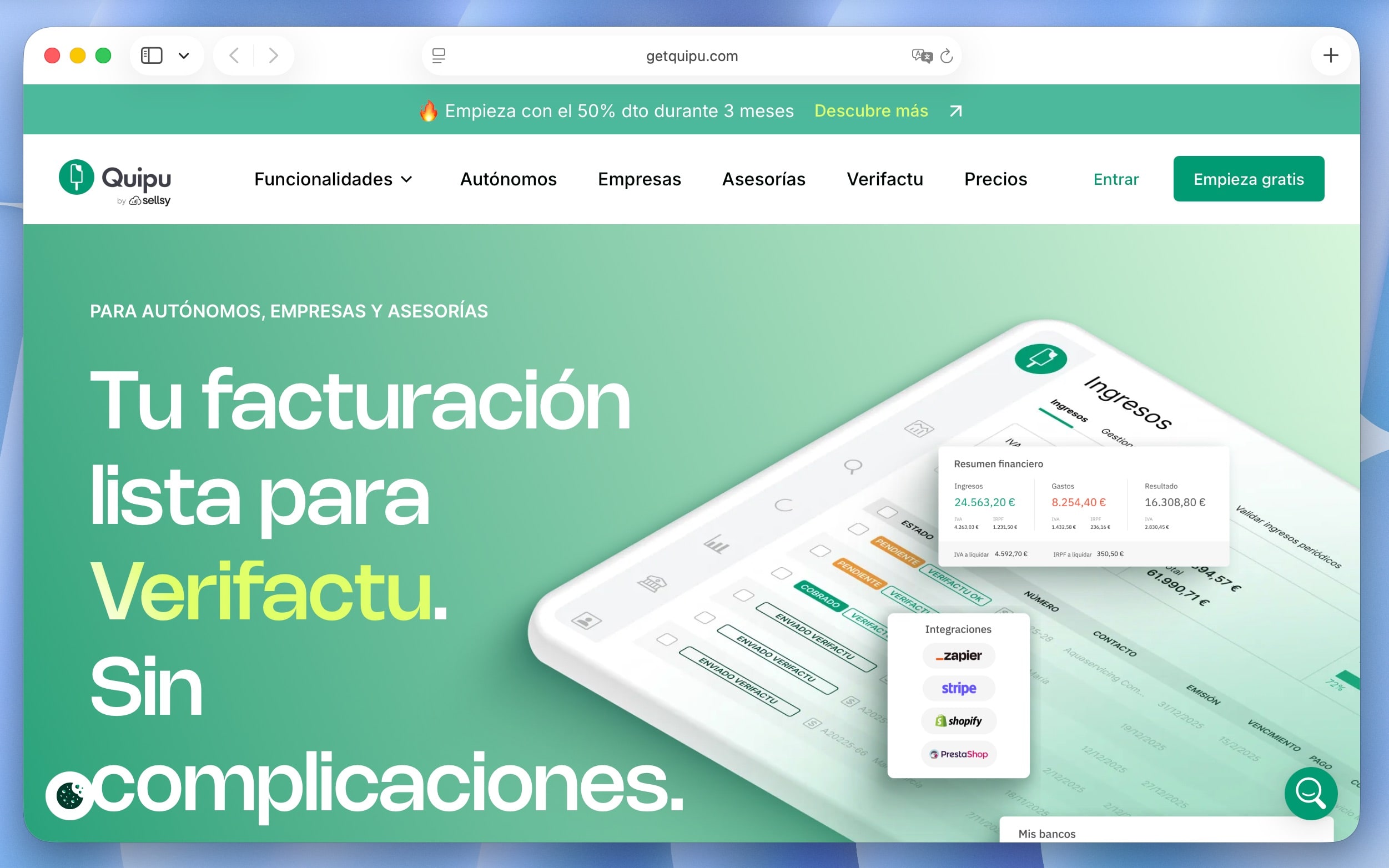
Quipu integration for electronic invoicing in Spain

We have developed a new integration with Quipu, allowing Spanish properties to connect FrontDesk Master with electronic invoicing workflow.  Issue, manage, and synchronize invoices in compliance with local requirements, directly from your FrontDesk Master account.

> Learn more and enable the integration.


New permission: Edit past transactions

By default, FrontDesk Master allows editing all past transactions, just as before. Now, administrators can restrict how far back users are allowed to make changes, improving financial control and reducing the risk of accidental edits. You can choose to allow editing:

  • Only today’s transactions
  • Transactions from the current week
  • Transactions from the current month
  • Or all past transactions (default option)


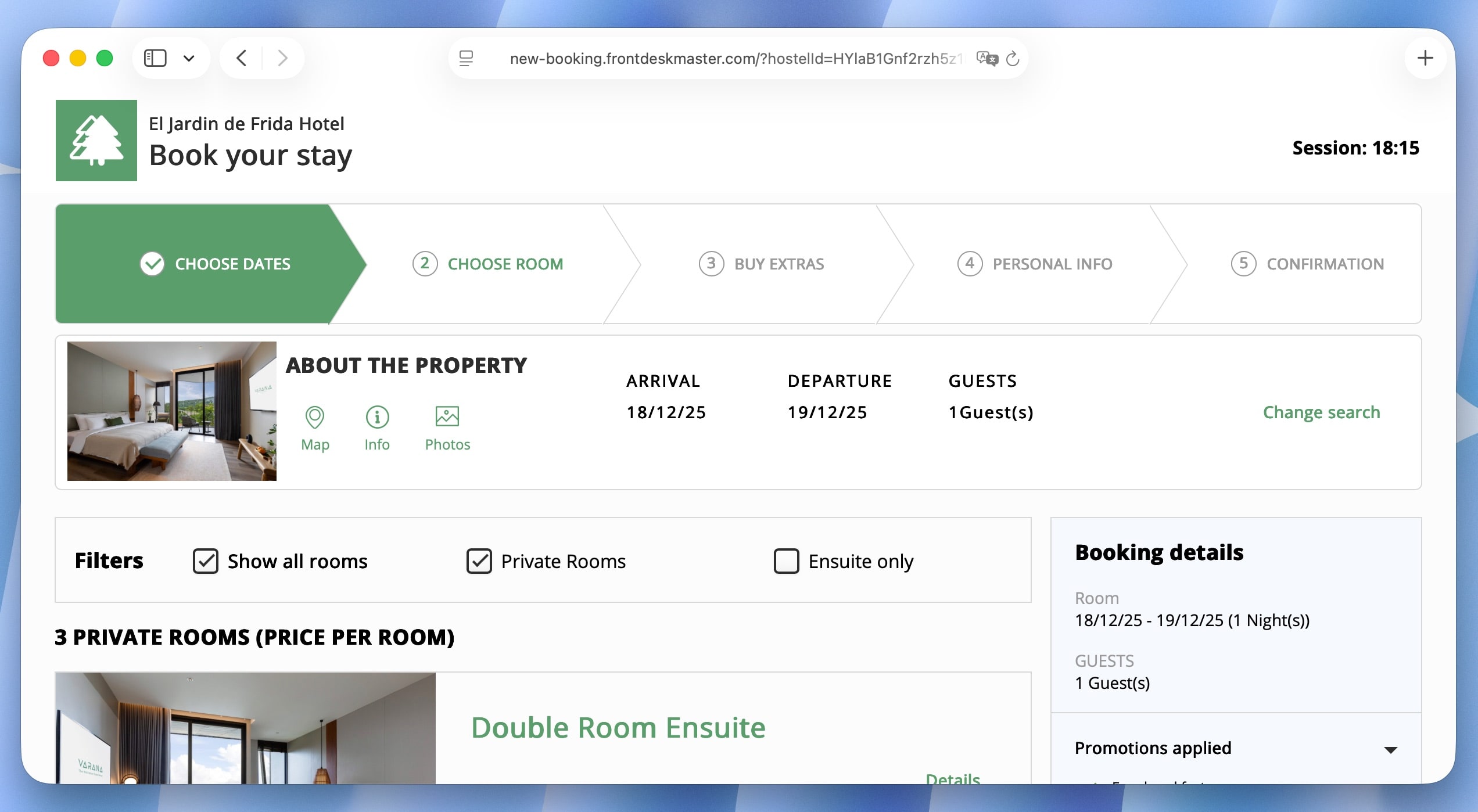
Booking Engine UI improvements

We have made several user interface improvements to the Booking Engine, making it clearer, more consistent, and easier for guests to complete their bookings. These updates improve the overall booking experience without changing your existing setup.


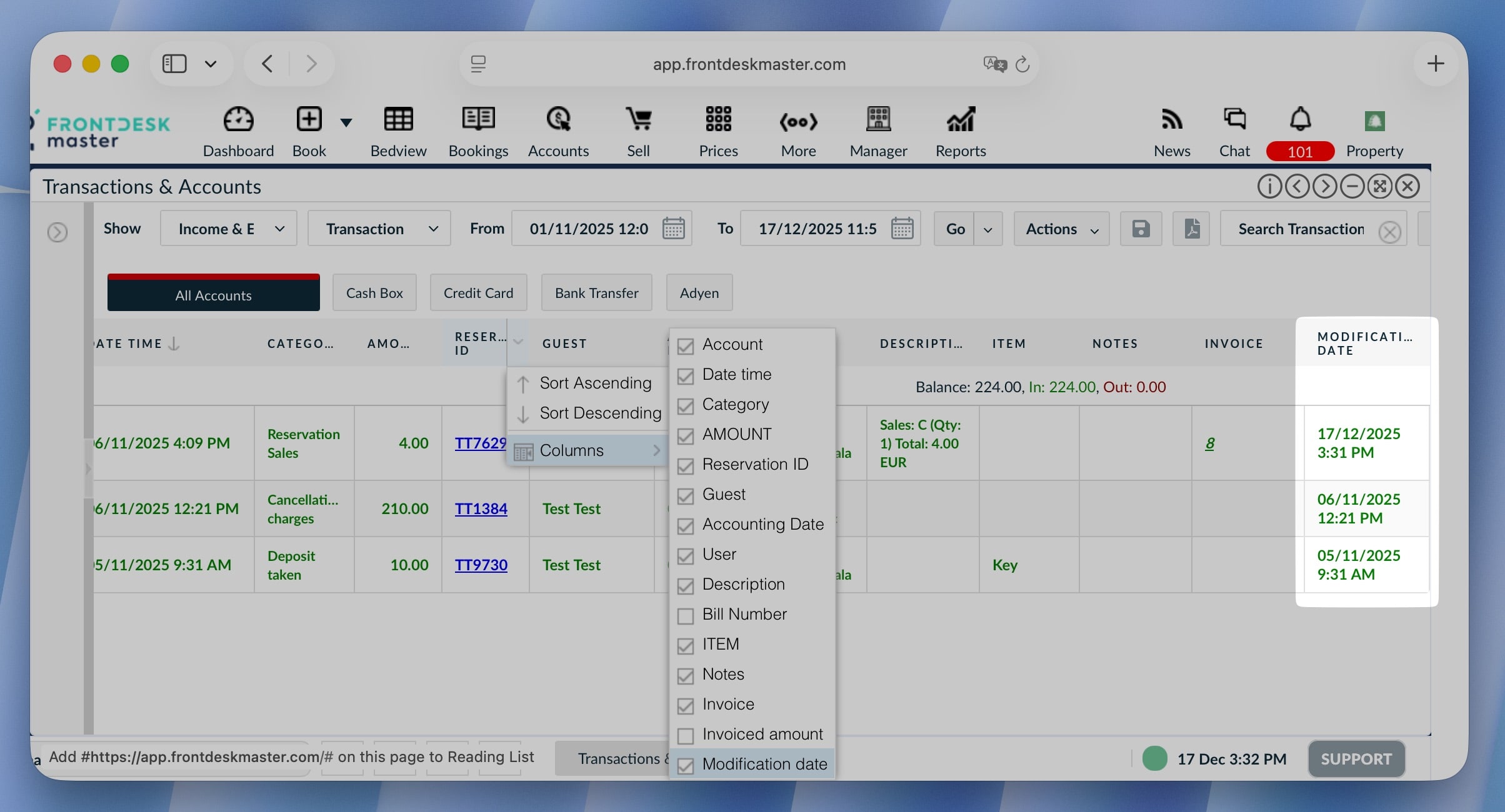
Accounts: Modification date column

A new “Modification date” column has been added to the Accounts. It helps you quickly identify recent changes, improving traceability and making it easier to review or audit transaction updates.


Other improvements

  • Exported invoice files now include the reservation ID in the file name.
  • Sales tab: Prevent editing paid amounts in sale items without a transaction
  • Booking method name shown when logo is unavailable
  • Clear error message in reservation history after cancelling HW reservations
  • Reports now include property name in file names and titles
  • Property icon used when adding Booking Engine link to bookmarks


Bug fixes

  • Fixed incorrect balances after Expedia reservation modifications
  • Fixed incorrect totals from SiteMinder for extra person charges
  • Fixed duplicate tax applied after reservation changes
  • Fixed meal consumption date calculation in the Booking Engine
  • Fixed seasonal pricing calculation in secondary currency

⚠️ Booking.com outage (resolved)

Dear customers,

We would like to inform you that between 01-02.12.2025, Booking.com has been experiencing an issue which may have caused some reservations not to be downloaded into the system on time.

We kindly ask you to check if the reservations made, modified or cancelled on Booking.com on those dates are present in your system. If you notice any missing bookings, please add them manually and ensure the correct Reservation ID is entered in the Reservation Details field.

If you have any questions or concerns, feel free to reach out to us at support@frontdeskmaster.com.

Best regards,
FrontDesk Master Team

FrontDesk Master update

October 23, 2025

Hello everyone!

Today we have released a new system update. Have a look at the features and fixes below and stay tuned for the next release!

— FrontDesk Master Team ✨


Clock-in improvements

We have added a new permission that requires users to clock-in to access the system. You can enable it for users in General functionality permissions, or contact us to add this permission.

Additionally, clocked-in users will receive a popup reminder about clocking-out when logging out from the system or closing shift.

Clock-out confirmation

> Learn more about Timesheet and Clock features.


Cleaning fee on Booking Engine

Show the amount of the cleaning fee for guests booking on your Booking Engine. You can configure the cleaning fee in Property Settings / Booking Engine / Settings:

And it will be added per stay to the reservation summary:

It can be then edited directly in the reservation, in the Payments tab:


Agoda CC details now available

We have enabled CC collect for Agoda. From now on, you can find cc details for Agoda reservations in the system, if they are provided by the channel.

Note that Agoda shares the CC details to channel manager only for UPC payment method.

> Learn more Agoda payment methods.


Commission in Daily Revenue report

We have removed the Accounting Mode option in the Daily Revenue report and replaced it with a Commission row in Taxes and Fees section that shows the value of commission collected by channels (like Hostelworld’s commission).

Note: Room revenue doesn’t include commission. 


Bug fixes:

  • Fix buttons in Take Payment
  • Fix the Today button in the calendar
  • Fix link in notification about reservation allocated to different rooms
  • Emails: Send copy to BCC instead of regular email
  • Fix incorrect price when cancelling nights from overview table
  • Fix problem with assigning bookings to another room type from right click even if there is a free bed
  • Fix: Reservation total set to zero changes when room is moved

⚠️ Booking.com outage (resolved)

Dear customers,

We would like to inform you that tonight, 16.09.2025, Booking.com experienced an issue which may have caused some reservations not to be downloaded into the system on time.

The outage started at 2025-09-16, 12:55:39 AM UTC and was resolved at 2025-09-16, 02:33:50 AM UTC.

All new bookings should now be received correctly and without delays.

We kindly ask you to check if the reservations made, modified or cancelled between the mentioned hours are present in your system. If you notice any missing bookings, please add them manually and ensure the correct Reservation ID is entered in the Reservation Details field.

If you have any questions or concerns, feel free to reach out to us at support@frontdeskmaster.com.

Best regards,
FrontDesk Master Team